- Aug 1, 2024
Authentication tokens vs cookies - what is the difference?
- Daniel Krzyczkowski
Tokens and cookies are both mechanisms used to manage sessions and authentication in web applications, but they differ in how they work, their use cases, and their advantages and disadvantages. Below is a detailed explanation of the differences, pros, cons, and when to use each. having security in mind.
Tokens

Tokens are pieces of data (typically strings) that are used to verify the identity of a user or client. They are often used in modern web applications, particularly in API-driven architectures.
How Tokens Work?
Authentication: After a user logs in, the server generates a token (such as a JSON Web Token - JWT) and sends it to the client.
Storage: The token is typically stored on the client side, often in local storage, session storage, or a cookie (we will talk about it later in this post).
Requests: The client includes the token in the headers of subsequent requests to the server, usually in the Authorization header (e.g., Bearer ).
Verification: The server verifies the token with each request to determine if the user is authenticated.
What are the pros and cons of using tokens?
Here are some of the advantages of using tokens:
Stateless: Tokens are usually self-contained and can store user information and claims, allowing servers to be stateless. This improves scalability since the server doesn’t need to store session data.
Cross-Domain/CSRF Protection: Tokens can be sent in headers, making them less vulnerable to Cross-Site Request Forgery (CSRF) attacks compared to cookies.
Flexibility: Tokens can be used across different domains and services, making them ideal for microservices and API-based architectures.
Decoupled Authentication: Since tokens are decoupled from the server, they can be used in various contexts, such as Single Page Applications (SPAs) and mobile apps.
As with everything, there are also some downsides:
Storage Security: If tokens are stored in local storage or session storage, they may be vulnerable to Cross-Site Scripting (XSS) attacks.
Token Size: Tokens, especially JWTs, can become large if they contain a lot of data, potentially leading to higher latency.
No Automatic Expiration Handling: The client must handle token expiration and renewal, which can add complexity to the application.
When to use tokens?
API-Driven Applications: Especially in Single Page Applications (SPAs) and mobile apps where you have a separate frontend and backend.
Cross-Domain Authentication: When your application requires interaction across different domains.
Microservices Architecture: Where different services need to authenticate users independently.
What are the token types user for authentication?
Session Tokens
Often stored in cookies to maintain a user's session after login. They act as a key to identify the user on subsequent requests without requiring re-authentication.
Here are some more details about session tokens:
Session-Based Authentication: In a session-based authentication system, when a user logs in, the server creates a session and stores it in the server's memory (or a database). A session token (usually just a random identifier) is then generated and sent to the client, typically stored in a cookie.
Server-Side Storage: The session token itself is meaningless without the corresponding data stored on the server. The server keeps track of the session data (like the user ID, roles, etc.) associated with this token.
Validation: When the client makes subsequent requests, it sends the session token back to the server (usually automatically if stored in a cookie). The server then looks up the session data associated with the token to validate the user's identity and permissions.
What about security?
Session Expiry: Sessions typically have an expiration time after which the server invalidates them. This helps in reducing the risk if a token is compromised.
CSRF Protection: Since session tokens are often stored in cookies, they can be vulnerable to Cross-Site Request Forgery (CSRF) attacks unless appropriate measures like CSRF tokens and the SameSite attribute are used.
Pros:
Centralized Control: Since session data is stored server-side, the server has complete control over user sessions. This allows easy invalidation of sessions, centralized management, and secure handling of sensitive data.
Scalability: It can be easier to manage if the session data is minimal and centralized, especially in smaller applications.
Cons:
Stateful: The server needs to maintain state, which can become challenging in distributed systems or when scaling horizontally. Load balancers and distributed caches (like Redis) are often required.
-
Scalability Issues: As the number of users grows, managing session data on the server can become cumbersome and resource-intensive.
Pros:
Stateless and Scalable: Since JWTs do not require the server to store session data, they are highly scalable and ideal for microservices or distributed systems.
Self-Contained: JWTs can carry all the necessary information, reducing the need for repeated database queries.
Flexible: JWTs can be used across different domains, services, and even passed between different backend services, making them versatile.
Cons:
Revocation Challenges: Revoking a JWT is difficult because the server does not keep track of them. Once issued, a JWT is valid until it expires, unless the server implements a token blacklist.
Payload Size: JWTs can become large if they contain too much information, leading to higher bandwidth usage.
Security Risks: If the token includes sensitive information (like user roles or permissions), it can be exposed if not encrypted, leading to potential security vulnerabilities.
JWTs (JSON Web Tokens)
JWT is a stateless authentication mechanism where the server issues a token after the user logs in. This token contains a payload with user data (e.g., user ID, roles, etc.) and is signed with a secret or private key. The JWT is typically stored on the client side, either in local storage, session storage, or cookies. On each subsequent request, the client sends the JWT to the server (often in an Authorization header). The server validates the token by verifying its signature and then reads the encoded data to authenticate the user.
What about security?
Token Integrity: Since JWTs are signed, the server can verify that the token has not been tampered with. However, if the signing key is compromised, all tokens become vulnerable.
No Server-Side Storage: The server doesn’t store session data, making JWTs scalable and ideal for stateless, distributed systems.
Expiration: JWTs typically include an exp claim, which sets an expiration time for the token. After this time, the token is no longer valid.
CSRF and XSS Risks: Like session tokens, JWTs can be vulnerable to CSRF if stored in cookies, or to XSS if stored in local storage.
To summarize:
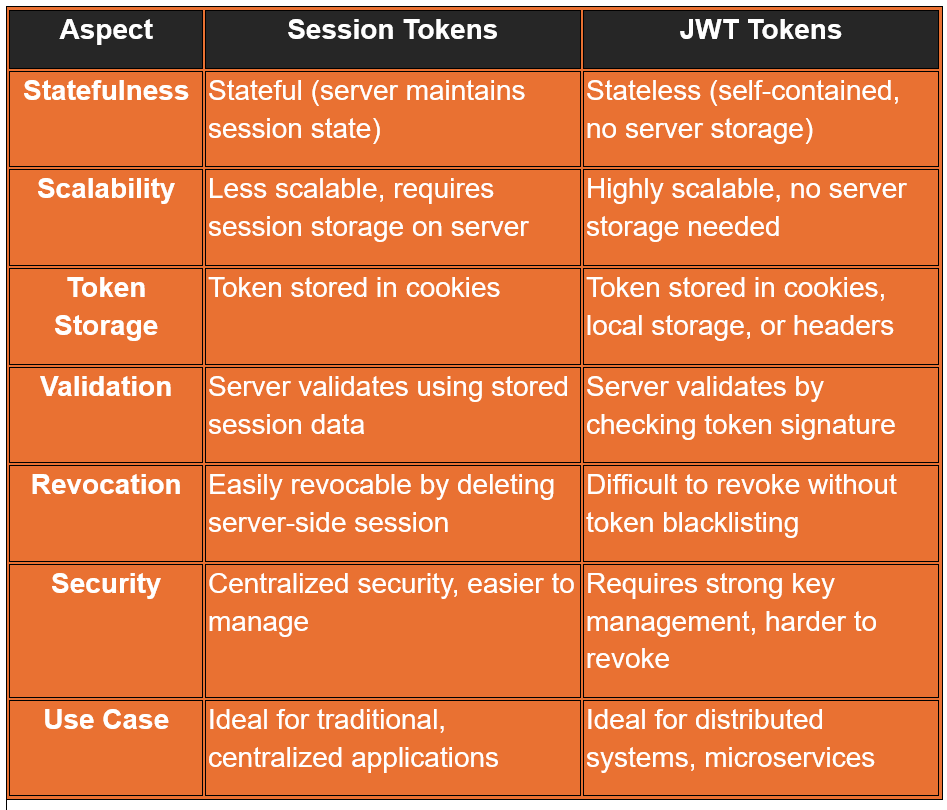
Session Tokens are better suited for applications where centralized control and easy session management are essential. They are straightforward and offer a high degree of control over user sessions but require the server to maintain state.
JWT Tokens are ideal for stateless, scalable applications, particularly in distributed systems or microservices architectures. They offer flexibility and independence from server state but come with challenges related to security, token revocation, and payload size.
Once we understand more about tokens, let's talk about cookies.
Cookies

Cookies are small pieces of data stored in the user's browser by the server. They are commonly used to maintain session state and store user preferences.
After a user logs in, the server sends a cookie to the client, which is stored in the user's browser. Cookies are automatically sent by the browser with each subsequent request to the server, in the Cookie header. Session Management: Cookies are often used to maintain sessions by storing a session identifier.
What are the pros and cons of using cookies?
Here are some of the advantages of using cookies:
Automatic Handling: Browsers automatically handle cookies, including sending them with requests and handling expiration.
Built-In Security Features: Cookies support attributes like HttpOnly, Secure, and SameSite, which help protect against XSS and CSRF attacks.
Stateful Sessions: Servers can maintain stateful sessions using cookies, which simplifies user session management.
Any downsides?
CSRF Vulnerability: Since cookies are automatically sent with every request, they are vulnerable to CSRF attacks unless mitigated by using the SameSite attribute.
Limited Storage: Cookies have a size limit (around 4KB), which can be restrictive for storing larger amounts of data.
Single Domain: Cookies are domain-specific and generally cannot be shared across different domains, making them less flexible for cross-domain applications.
Stateful: Cookies often require the server to store session data, which can be less scalable than token-based authentication.
When to use cookies?
Traditional Web Applications: When building traditional web applications where the frontend and backend are tightly coupled.
Server-Managed Sessions: When you prefer the server to manage session state and maintain tight control over user sessions.
Sensitive Information: When security attributes like HttpOnly and Secure are crucial to protecting sensitive information.
Can tokens be stored in cookies?
This can be a surprise for some of you but actually tokens can be stored in cookies. It's essential to consider various security aspects to protect your application and users. Here's an in-depth explanation of storing tokens in cookies, along with the associated security considerations:
HTTP-Only Cookies
The HttpOnly attribute ensures that the cookie cannot be accessed via JavaScript (e.g., document.cookie). This protects against Cross-Site Scripting (XSS) attacks, where an attacker might inject malicious scripts into a web page to steal cookies.
Secure Cookies
The Secure attribute ensures that the cookie is only sent over HTTPS, not HTTP. This prevents the token from being intercepted during transmission by attackers using techniques like man-in-the-middle attacks.
SameSite Attribute
The SameSite attribute controls whether cookies are sent with cross-site requests.
There are two options:
Strict: Cookies are sent only if the request originates from the same site.
Lax: Cookies are sent with same-site requests and some cross-site requests (e.g., GET requests).
None: Cookies are sent with all requests, but must be Secure.
This mitigates Cross-Site Request Forgery (CSRF) attacks, where a malicious site could trick a user's browser into making unintended requests to your site.
Token Expiration and Rotation
Tokens should have a short lifespan and be rotated frequently to minimize the impact if a token is compromised. Short-lived tokens reduce the time window an attacker can exploit a stolen token. Token rotation ensures that even if a token is compromised, it will soon be replaced.
CSRF Protection
CSRF attacks exploit the fact that browsers automatically include cookies in requests. If an attacker tricks a user into making a request, the browser might include an authentication token stored in a cookie.
Encryption
While cookies themselves cannot be encrypted, the content stored within them (e.g., JWTs) can be. Encrypting the token ensures that if a cookie is intercepted or accessed in some way, its content is not immediately useful. Use encryption libraries to encrypt tokens before storing them in cookies and decrypt them server-side upon retrieval.
Summary
It is always important decision which one to choose depending on the specific scenarios. Use tokens for stateless, API-driven, cross-domain, or microservice architectures where scalability and flexibility are key concerns. On the other side using cookies can be a better idea for traditional web applications with server-managed sessions and when automatic handling of session data and security features are important. Each has its strengths and trade-offs, so the choice depends on your specific application needs.