- Jan 8
Token security with BFF pattern
- Daniel Krzyczkowski
Modern web applications rely heavily on tokens (such as JWTs or opaque access tokens) to authenticate users and authorize requests. While tokens are powerful, how and where they are stored has a major impact on application security.
The Backend for Frontend (BFF) pattern is an architectural approach that significantly improves token security by removing tokens from the browser runtime and storing them safely in encrypted, secure cookies.
This article explains the BFF concept and how it enhances token security through proper cookie-based storage.
The Token Security Problem in Browser-Based Apps
Single Page Applications (SPAs) traditionally store tokens in the browser using:
localStorage
sessionStorage
JavaScript memory
Why is it dangerous?
XSS (Cross-Site Scripting)
Injected JavaScript can read tokens directly.
Token replay attacks
Stolen tokens can be reused from anywhere.
No isolation
Tokens are exposed to the full browser runtime.
In practice, one XSS vulnerability can compromise all authenticated users.
What Is the Backend for Frontend (BFF) Pattern?
The Backend for Frontend (BFF) pattern introduces a dedicated backend for each frontend application:
Instead of this direct interaction: Browser → API Gateway / Microservices
The architecture becomes: Browser → BFF → APIs / Microservices
Key characteristics of a BFF
Each frontend has its own specialized backend
The frontend never directly calls internal APIs
The BFF is responsible for:
Authentication and authorization
Token storage and lifecycle
API orchestration
Security enforcement
The BFF acts as a trusted security boundary between the browser and backend services.
How BFF Improves Token Security
The BFF pattern changes the trust model. The browser should never directly handle access or refresh tokens. Instead, the BFF manages tokens and exposes only a session abstraction to the browser.
There are two common BFF approaches:
Server-side token storage
Encrypted token storage in HTTP-only cookies
This article focuses on the second approach, which is widely used and effective when implemented correctly.
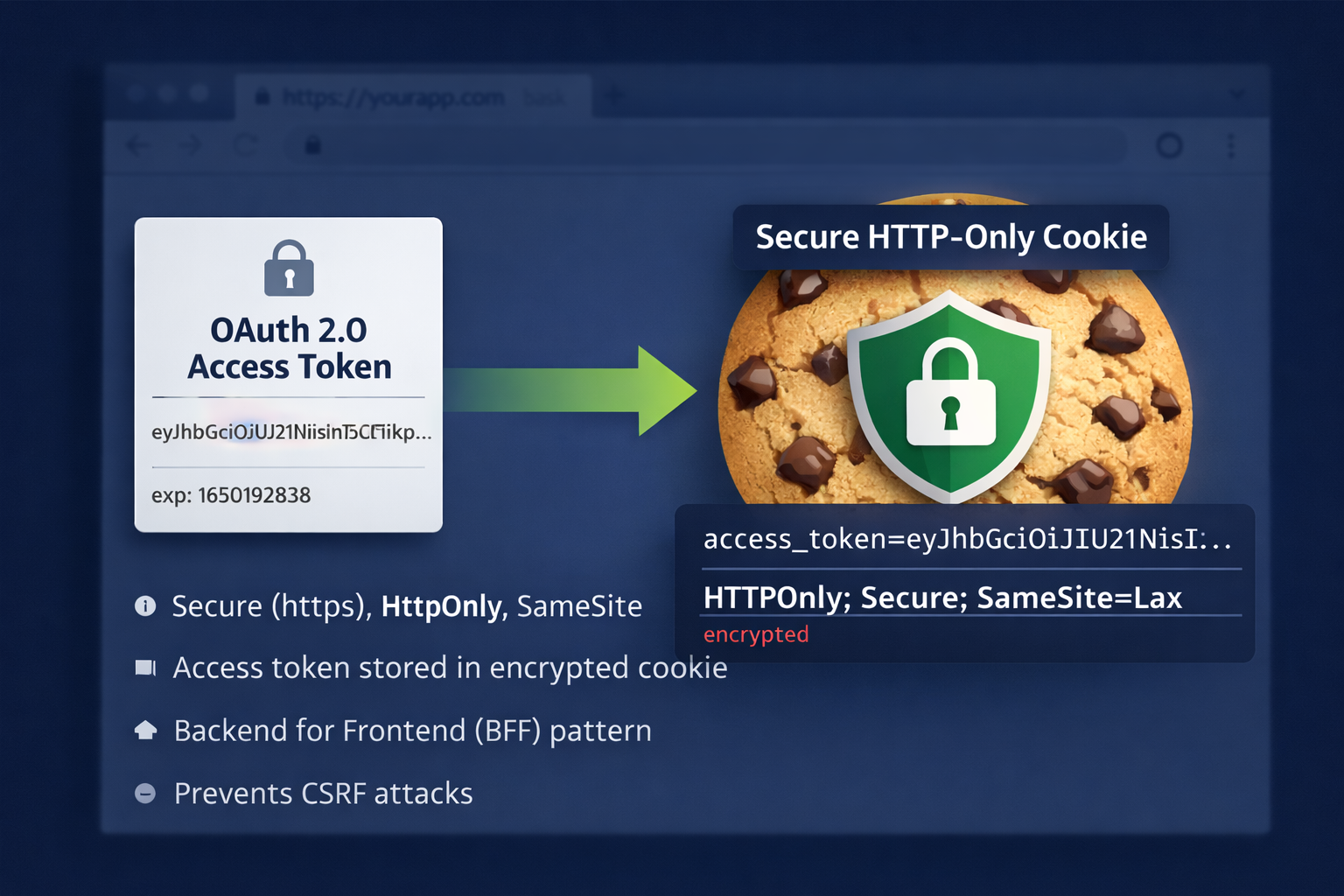
How Encrypted Cookie-Based Token Storage Works
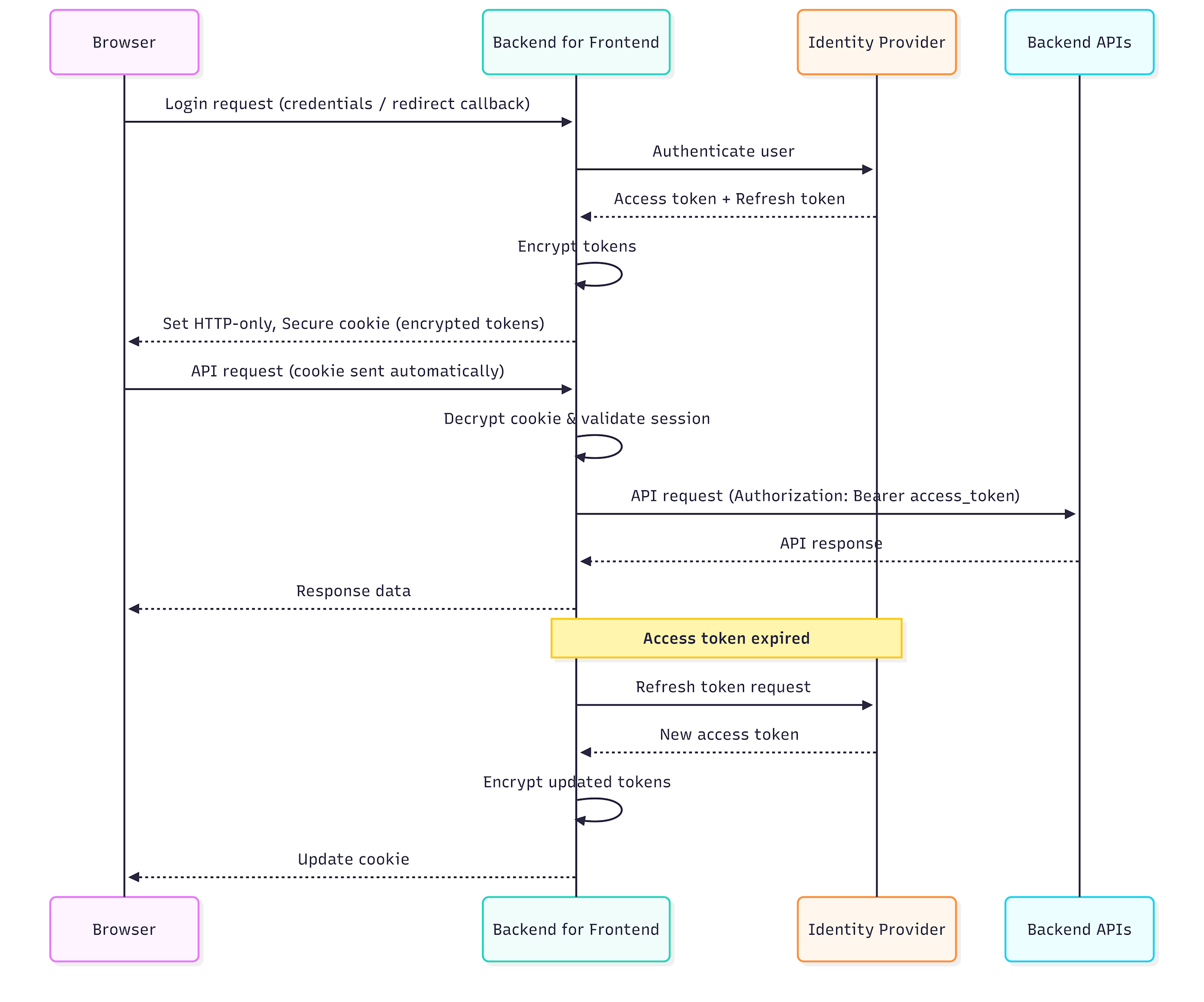
User authenticates via the BFF
BFF receives access and refresh tokens
Tokens are:
Serialized
Encrypted using a strong server-side key
Encrypted data is stored in an HTTP-only cookie
Browser sends the cookie automatically
BFF decrypts the cookie on each request
BFF attaches tokens when calling backend APIs
At no point does JavaScript gain access to the tokens.
Why Tokens in Cookies Must Be Encrypted?
Even though cookies can be protected with HttpOnly, cookies are still sent with every request. This means:
They may pass through proxies
They may be logged accidentally
They may be exposed if TLS is terminated improperly
For this reason, tokens stored in cookies must always be encrypted. Never store raw access or refresh tokens in cookies. Always encrypt them first.
Secure Cookie Configuration
When storing encrypted tokens in cookies, the following flags are mandatory:
HttpOnly: Prevents JavaScript access
Secure: Ensures HTTPS-only transmission
You probably also wondering why SameSite flag is not listed above to mitigate CSRF attacks. Let's discuss this topic against OAuth flows.
What is the SameSite cookie flag?
The SameSite flag tells the browser:
When is it allowed to send this cookie if the request comes from another site?
It is a browser-side CSRF defense. The server sets the rule, but the browser enforces it. Before SameSite, browsers sent cookies on every request, even if:
The request was triggered by another site
The user didn’t intend to interact with your site
This made CSRF attacks easy. SameSite reduces this by limiting cross-site cookie sending.
There are three SameSite values:
SameSite=Strict
Cookie sent only for same-site requests
-
Cookies not sent on:
Links
Redirects
OAuth callbacks
External navigations
In case of Strict value OAuth flows always fail. Why?
OAuth always redirects from an IdP domain
That redirect is cross-site
Browser refuses to send the cookie
OAuth state / nonce / session cookie is missing
SameSite=Lax
-
Cookie sent for:
Same-site requests
Cross-site top-level GET navigations
-
Cookie not sent for:
Cross-site POST
Form submissions
Iframes
AJAX
In case of Lax value here is the situation OAuth works or breaks depending on response mode:
Auth using response_mode=form_post (cross-site POST) will not work
OAuth redirect using GET (with query or fragment) will work
SameSite=None
Cookie sent on all requests (GET, POST, iframe, AJAX)
Must be paired with Secure cookie flag
OAuth flows always work
Why OAuth is sensitive to SameSite?
OAuth relies on temporary cookies for:
state
nonce
correlation/session identifiers
If the browser does not send those cookies back on the callback:
The server cannot verify the login
OAuth libraries on the application side reject the request
In general it is recommended to use SameSite=Lax with response_mode=query when using OAuth Authorization code flow with PKCE.
Summary
The Backend for Frontend (BFF) pattern addresses key security issues of SPAs in OIDC/OAuth 2.0 by moving authentication responsibilities from the browser to a confidential backend. The backend handles token negotiation with the authorization server, so the SPA never directly manages tokens.
With BFF, the SPA does not store access or refresh tokens, avoiding token leakage and re-authentication issues on page refresh. Instead, the backend maintains the user session using a Secure, HttpOnly cookie that is tied to the issued tokens. Tokens may be stored server-side or inside the session cookie, but if stored in cookies, they must be encrypted.
To be secure, the backend must also implement CSRF protections, as cookies are automatically sent by the browser. Because of these requirements, the BFF pattern only works when the SPA is served by the backend itself, not as a standalone SPA calling APIs directly from JavaScript.
The BFF pattern moves OAuth/OIDC token handling from the browser to a confidential backend, eliminating the need for SPAs to manage or store tokens.
User sessions are maintained with cookies associated with the issued tokens; if tokens are stored in cookies, they must be encrypted and protected against CSRF attacks. Secure, HttpOnly flags must be used and Lax flag when possible.